Scope Cam
Last updated: November 2026
I shoot olympic-style 10M Air Pistol. In order to see and score without having to move position, I had a webcam strapped to a sighting scope. It worked pretty well but there was a long USB cable and any slight bump would upset the whole setup. This details a small computer I set up AT the target, which streams the target view onto my network, so I can see how I'm doing from my laptop. This has quickly led to the realization that we have good streaming data that can be analyzed - my next step is live scoring through shot detection.
The hardware
| Part | What |
|---|---|
| Pi Zero 2 W | Dual-core A53, 512MB RAM, WiFi |
| OV5647 camera | 5MP sensor, the classic Pi Camera Module v1 |
| microSD card | 64GB (overkill, it is what I had) |
The whole thing is smaller than a deck of cards and runs off a phone charger. Total cost roughly $45.
What it does
The Pi boots, connects to WiFi, and starts an MJPEG streaming server on port
- Any browser on the network can open
http://scopecam.local:8080/stream.mjpg
and see a live feed. There is also a snapshot endpoint at /snapshot.jpg and a
WebSocket broadcaster on port 8081 for piping frames to a server-side
detection pipeline.
The camera runs at full sensor resolution internally but streams at 1920×1080 with JPEG quality 75, about 200KB per frame, a 5.8× reduction from the 1.1MB full-res frames.
Tuning
Out of the box, the Pi Zero 2 W is a tight fit for continuous camera streaming. The default Raspberry Pi OS config reserves 128MB of the 512MB RAM for the GPU. That leaves 353MB visible to the system, and with Python + libcamera + multiple HTTP clients and OOM crashes started to occur.
Adjustments I found worked to give me a little more RAM breathing room:
- gpu_mem=64: cut GPU allocation in half. The Pi is headless, so it does not need framebuffers for a display. The GPU still runs the camera ISP pipeline, but 64MB is plenty for that. This recovered 61MB for the system.
- 1920×1080 instead of 2592×1944: the full 5MP sensor mode produces good detail, but each raw buffer is enormous. Dropping to 1080p cut frame data by more than half while staying sharp enough for viewing and analysis.
- JPEG quality 90 to 75: JPEG quality scaling is non-linear. Going from 90 to 75 is barely visible to the eye but cuts file size by roughly 40%.
| Metric | Before | After |
|---|---|---|
| Total RAM | 353MB | 414MB |
| Available RAM | 85MB | 186MB |
| GPU memory | 128MB | 64MB |
| Frame size | 1.1MB | ~200KB |
| Swap used | 52.5MB | 0MB |
Available RAM more than doubled and swap dropped to zero.
The software stack
- libcamera: the modern camera stack on Raspberry Pi OS (Bookworm+). The OV5647 uses the vc4 pipeline with a dedicated tuning file.
- Picamera2: the Python libcamera wrapper.
- JpegEncoder: hardware JPEG encoder on the Pi's GPU. Keeps the CPU free for serving clients.
- Pure Python HTTP server:
http.server.ThreadingHTTPServerwith amultipart/x-mixed-replaceMJPEG handler. No framework, no dependencies. - websockets: pure Python WebSocket server for frame broadcast to the detection pipeline.
The whole server is a single 145-line Python file.
The target, drawn over the live view
A 10m air pistol target is a known geometry: rings of fixed diameter on a card, with a black center. Once the camera is calibrated against that card, the geometry can be drawn on top of the video: the numbered rings in these screenshots are not printed on the paper. They are rendered from the calibration, which is why they sit so squarely over the card at an angle.
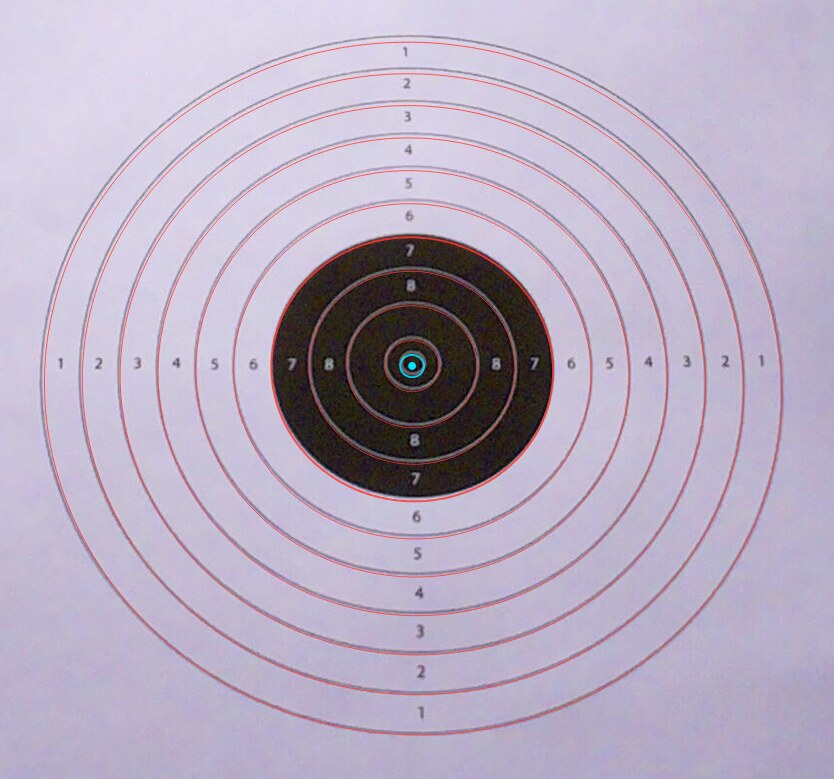
Calibration is one button, New target + calibrate, and it is done per card.
From then on the app knows where the center is and what a pixel is worth in
millimeters, and every later measurement is arithmetic instead of guesswork.
Scoring
Scoring is a click. Put the crosshair on the hole and click the card; the app records the shot, measures its radius from the center in millimeters, and derives the score from that radius. Each shot is drawn on the view as it lands.
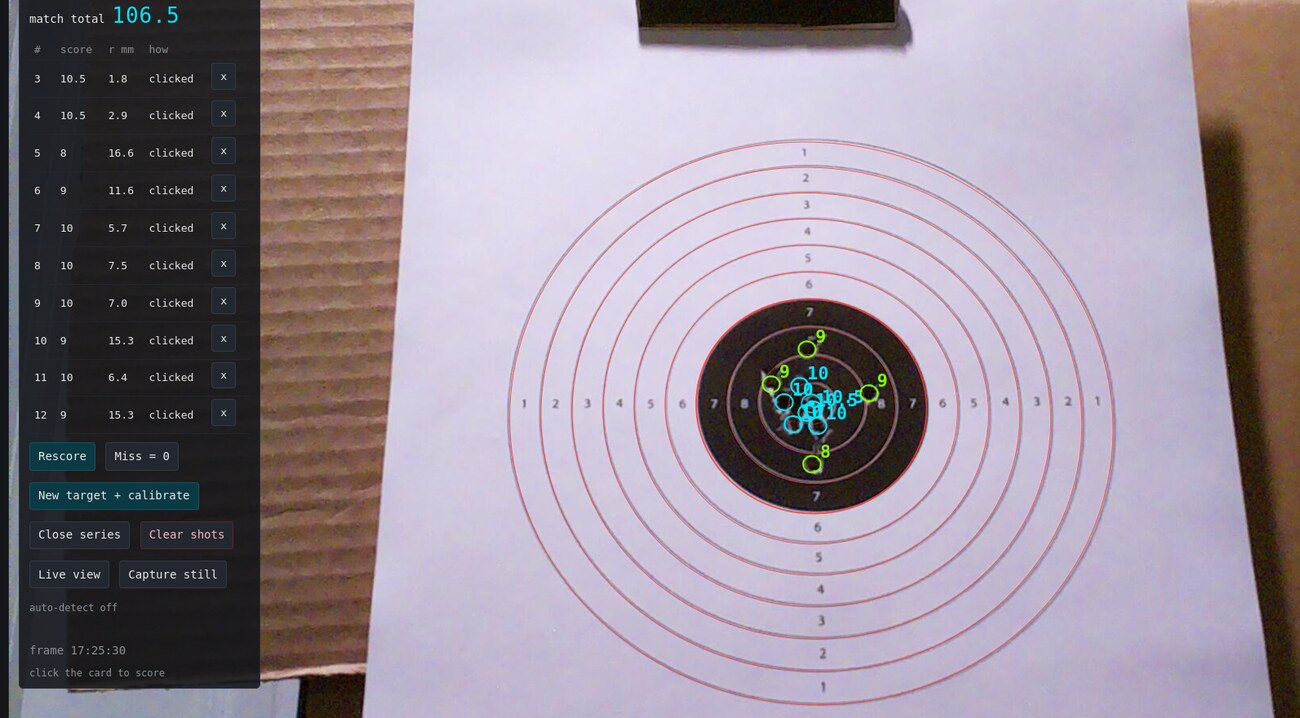
The panel keeps the series as a list: shot number, score, radius, and how the shot was entered:
| # | score | r mm | how |
|---|---|---|---|
| 3 | 10.5 | 1.8 | clicked |
| 4 | 10.5 | 2.9 | clicked |
| 5 | 8 | 16.6 | clicked |
| 7 | 10 | 5.7 | clicked |
| 11 | 10 | 6.4 | clicked |
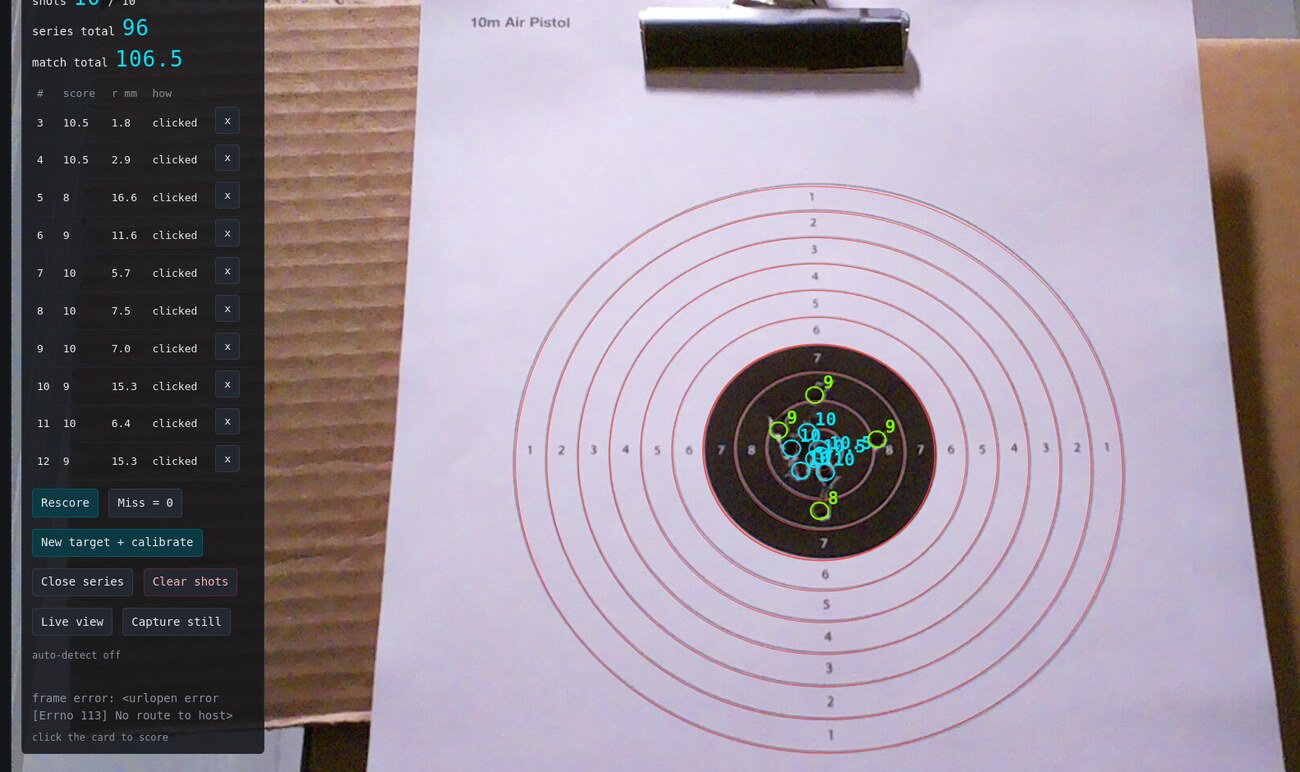
The two totals above the list are the ones that matter at the firing line:
series total for the ten-shot series, and match total across the match, which
is six series. SERIES 2 / 6 in the header is where you are in that match.
Manual on purpose, for now
auto-detect off: the panel says so plainly, and every entry above reads
clicked for the same reason. Shot detection is the goal and it is not trusted
yet, so shots are entered by hand. That keeps the record honest: every row
carries a radius that a person agreed with.
Keeping the data
Scoring by hand is also what produces labeled data. Every shot leaves behind a frame, a position, and a score someone confirmed, which is exactly what a detector needs and cannot invent.
So each series is being recorded, per shot:
- the difference frames between shots: what actually changed on the card between one shot and the next. That difference is the signal a detector would have to read.
- the final frame with all ten shots on the card
- the shot data itself: score, radius in mm, and how each shot was entered
Saved together per series, that is a training set rather than an archive. Enough of them and the difference frames stop being a record and start being a model: one that proposes a shot, with the manual score as the check on it.
What is next
Train on the recorded series, then turn auto-detect on.
The WebSocket broadcaster already pipes every frame to port 8081, so the detection itself belongs on the more capable machine rather than the Pi. The approach I am heading toward is lightweight frame differencing on the desktop side, keyed to the regions of interest rather than full-frame analysis, and now with recorded series to measure it against.
Links
- scopecam - source not yet public
- Pi Zero 2 W - the board
- OV5647 Camera Module v1 - the sensor
- Picamera2 - the Python camera library